Showing posts with label logging. Show all posts

Sunday, May 13, 2018

Tips&Tricks – Attention When Changing Windows Defender Firewall Default Log Path

Although nowadays you could (err…should) configure event viewer (or centralized logging) for your Windows Defender Firewall, here’s a tip for something I’ve noticed when changed the default Windows Defender Firewall location.

When applying a GPO to do this, you must keep in mind that MpsSvc service account is responsible to write down the Windows Firewall log, so, if you change the default location (%windir%\System32\LogFiles\Firewall) you need to give it the right NTFS permissions.

So basically what you need to do:

  1. Change the default location for the Windows Firewall log
  2. Go to the new location
  3. Right-click the folder and then Properties
  4. Click the Security tab and Edit
  5. Now, click Add
  6. Make sure that you’ve select the local computer and not the domain (in “Locations…”)
  7. Now type NT Service\MpsSvc and click OK
  8. Make sure MpsSvc has Write Access and click OK again

And…you’re done!

Monday, May 8, 2017

Enabling Group Policy Preferences Logging

Group Policy Preferences (GPP) are available since Windows 2008 / Windows 7 and they extend the expand the range of configurable setting within Group Policy Objects (GPO).

Although they provice a better targeting through item-level targeting and action modes, theres something not so good when you need to troubleshoot them.

Instead a quick look in the event viewer for example, you’ll need to enable GPP logging through GPO settings.

To do so, use the following steps:

  • Open Group Policy Management Console (GPMC)
  • Navigate to Computer Configuration\Policies\Administrative Templates\System\Group Policy
  • There you have Logging and Tracing folder
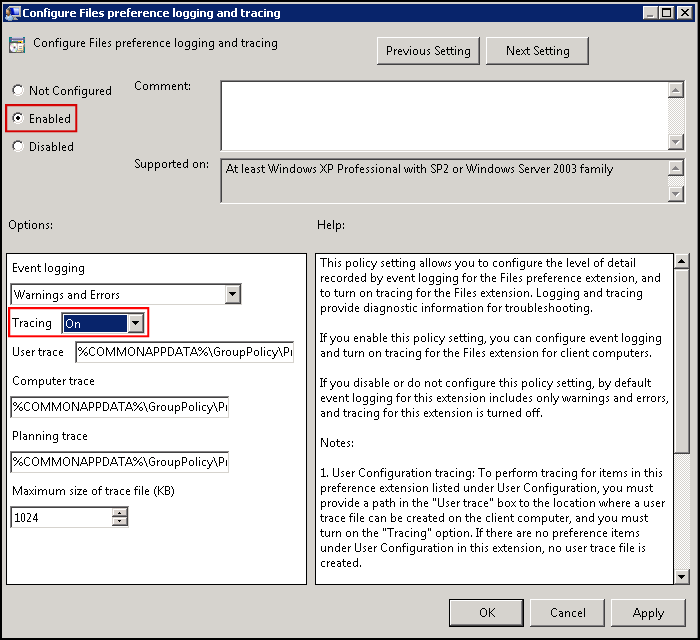
  • Configure as desired and restart machine

Inside this folder you’ll get everything you can trace.
You can set what to trace (ex.: Warnings and Errors), where to save the debug logs, maximum log size, etc.