Monday, June 26, 2023
Drivers and Firmware updates coming to Intune soon!
Thursday, June 22, 2023
Windows Autopilot Ultimate Guide by Robin Hobo
If you're looking for the most comprehensive step-by-step guide for Windows Autopilot, I strongly recommend you to take a look to Robin Hobo's "Windows Autopilot – The ultimate step-by-step deployment guide".
It's just so simple, accessible and straight forward that you will start using Autopilot in a couple of hours.
So, go ahead and take a look to Robin Hobo's post:
Robin Hobo - Windows Autopilot – The ultimate step-by-step deployment guide
Monday, February 27, 2023
Windows Deployment Services (WDS) - Issues after upgrade OS (Solved)
- Open an elevated command-line
- Run the following command:
wdsutil /Verbose /Progress /Uninitialize-Server
wdsutil /Verbose /Progress /Initialize-Server /REMINST:"c:\RemoteInstall" - Reboot the server
Sunday, February 12, 2023
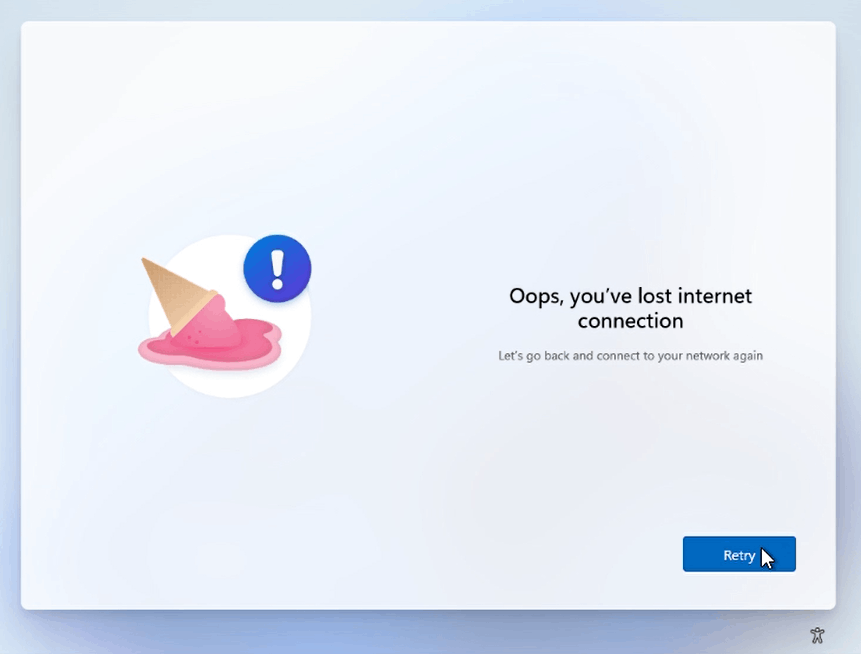
Windows 11 - How to bypass Internet connection install requirement
Starting with version 22H2 of Windows 11, Microsoft requires an Internet connection to install the OS. But...does it really?
Here's a quick step guide to bypass this requirement:
- Through the OOBE experience, you'll get to a screen that will say:
"Oops, you've lost internet connection" or "Let's connect you to a network" - Press "Shift+F10" to open a command-prompt
- In the cmd run the following command:
OOBE\BYPASSNRO - Your computer will restart and the OOBE will start again, but...now we have a new option called "I don't have Internet"
- And...it's done!
Tuesday, January 10, 2023
ControlUp - How to reset Real-time console to factory default
- Login in the machine you run the console
- Start > Run > %appdata%
- Delete the ControlUp folder
- Open Registry (regedit.exe)
- Delete or rename the following registry key:
HKEY_CURRENT_USER\Software\Smart-X\ControlUp
Now, just launch the console again and...there you go!
Friday, January 6, 2023
WDAC - Event IDs + Advanced Hunting Quick Reference
Here's just a quick reference for Windows Defender Application Guard Event IDs and the correspondent string (ActionType) for Defender Advanced Hunting:
|
ActionType |
EventID |
Description |
|
AppControlCodeIntegrityDriverRevoked |
3023 |
The driver file under validation didn't meet the requirements to
pass the application control policy. |
|
AppControlCodeIntegrityImageRevoked |
3036 |
The signed file under validation is signed by a code signing
certificate that has been revoked by Microsoft or the certificate issuing
authority. |
|
AppControlCodeIntegrityPolicyAudited |
3076 |
This event is the main Windows Defender Application Control
block event for audit mode policies. It indicates the file would have been
blocked if the WDAC policy was enforced. |
|
AppControlCodeIntegrityPolicyBlocked |
3077 |
This event is the main Windows Defender Application Control
block event for enforced policies. It indicates the file didn't pass your
WDAC policy and was blocked. |
|
AppControlExecutableAudited |
8003 |
Applied only when the Audit only enforcement mode is enabled.
Specifies the .exe or .dll file would be blocked if the Enforce rules
enforcement mode were enabled. |
|
AppControlExecutableBlocked |
8004 |
The .exe or .dll file can't run. |
|
AppControlPackagedAppAudited |
8021 |
Applied only when the Audit only enforcement mode is enabled.
Specifies the packaged app would be blocked if the Enforce rules enforcement
mode were enabled. |
|
AppControlPackagedAppBlocked |
8022 |
The packaged app was blocked by the policy. |
|
AppControlScriptAudited |
8006 |
Applied only when the Audit only enforcement mode is enabled.
Specifies the script or .msi file would be blocked if the Enforce rules
enforcement mode were enabled. |
|
AppControlScriptBlocked |
8007 |
Access to file name restricted by administrator. Applied when
the Enforce rules enforcement mode is set directly or indirectly through GPO
inheritance. The script or .msi file can't run. |
|
AppControlCIScriptAudited |
8028 |
Audit script/MSI file generated by Windows LockDown Policy
(WLDP) being called by the script hosts themselves. |
|
AppControlCIScriptBlocked |
8029 |
Block script/MSI file generated by Windows LockDown Policy
(WLDP) being called by the script hosts themselves. |
|
AppControlCodeIntegrityOriginAllowed |
3090 |
File was allowed due to good reputation (ISG) or installation
source (managed installer). |
|
AppControlCodeIntegrityOriginAudited |
3091 |
Reputation (ISG) and installation source (managed installer)
information for an audited file. |
|
AppControlCodeIntegrityOriginBlocked |
3092 |
Reputation (ISG) and installation source (managed installer)
information for a blocked file. |
|
AppControlCodeIntegrityPolicyLoaded |
3099 |
Indicates a policy has been successfully loaded. |
|
AppControlCodeIntegritySigningInformation |
3089 |
Signing information event correlated with either a 3076 or 3077
event. One 3089 event is generated for each signature of a file. |
|
AppControlPolicyApplied |
8001 |
Indicates the AppLocker policy was successfully applied to the
computer. |
AppLocker - How to clear policies from a machine (or multiple)
If you need to clear AppLocker polices here's how to do it:
- If your using some kind of method to deploy AppLocker policies to your machines, first of all disable it.
- The, create an .XML (ex.: clear.xml) file with the following rules:
<AppLockerPolicy Version="1">
<RuleCollection Type="Exe" EnforcementMode="NotConfigured" />
<RuleCollection Type="Msi" EnforcementMode="NotConfigured" />
<RuleCollection Type="Script" EnforcementMode="NotConfigured" />
<RuleCollection Type="Dll" EnforcementMode="NotConfigured" />
<RuleCollection Type="Appx" EnforcementMode="NotConfigured" />
<RuleCollection Type="ManagedInstaller" EnforcementMode="NotConfigured" />
</AppLockerPolicy> - Apply the new AppLocker policy opening an elevated PowerShell:
Import-Module AppLocker
Set-AppLockerPolicy -XMLPolicy .\clear.xml - Now, we need to run the following commands to stop the AppLocker services and the effects of the previous AppLocker policy:
appidtel.exe stop [-mionly]
sc.exe config appid start=demand
sc.exe config appidsvc start=demand
sc.exe config applockerfltr start=demand
sc stop applockerfltr
sc stop appidsvc
sc stop appid