Showing posts with label microsoft. Show all posts

Wednesday, October 18, 2023

VBScript to R.I.P. Soon


It seems like that after 30 years, the good old favorite scripting language for sysadmins is going to rest in peace.

VBScript aka Visual Basic Script was introduced in 1996 and integrates active scripting into Windows environments, and communicates with host applications through Windows Script.This was one of the favorites scripting languages for system administrators.

Microsoft announced VBScript's deprecation October 9th on it's "Deprecated features for Windows Client" article following the September announcement of WordPad end of life.

So, the plan to retire VBScript starts with it being preinstalled via Features on Demand (FoD), and in the "near future" remove it from the OS and only available has a FoD.

It had a been a long and fantastic life for VBScript. For those that never tested PowerShell, now is time to really dig into it. 

Long live VBScript. :)

Friday, October 6, 2023

Windows 11 September 2023 Update (23H2) Available

With more than 150 new features, Microsoft Windows 11 22H3 is now available.
There's a lot going on with this new update, and here's the Microsoft's summary about the most notorious changes and news:
The most personal Windows 11 experience begins rolling out today | Windows Experience Blog

Obviously, AI its the most prominent feature, embedded everywhere in the system, but here are some that I think can really help and give the OS even more day to day added value:

  • AI in Paint
    • This one it's a cool one, and may give Paint a new live. You'll know be able to remove backgrounds directly from Paint


  • Windows Backup
    • The new tool will allow you to effortlessly bakcup your folders, apps, settings and credentials, and get them back when you reinstall or get a new computer.
  • Passkeys
    • This is a new evolution on Hello for Business. It's now integrated by default in the OS. Passkeys are the cross-platform future of secure sign-in management and eliminate the need for passwords. A passkey creates a unique, unguessable credential and allows you to sign in using your face, fingerprint or device PIN. On Windows 11, passkeys will work with Edge, Chrome, Firefox and other browsers.

  • Mobile Application Management (MAM) for Windows
    • After long time with MAM for Android and iOS, now it come to Windows where you can now allow your employees to user their personal Windows device but, with controlled access to company information.
 There's a lot more about Windows 11 23H2, so please don't forget to review the official Microsoft post.

Wednesday, August 2, 2023

OneDrive Getting Customized Folder Colors


Microsoft announced that later this year, OneDrive will allow customizing folders color.
This has been a recurrent users request, that wanted to give different aspect to different types of content inside the folders.

Monday, July 31, 2023

Get Windows Information and Resources How You Want


Here's a nice Windows IT blog post of various ways to stay informed about Windows world.
From websites, blogs, X accounts, podcasts, it's a nice backed list of link to have Windows information the way it suits you best.

Take a look here:
Skilling snack: Windows information and resources for IT pros

Thursday, July 27, 2023

New Microsoft Teams Preview - How to Enable


The new Microsoft Teams is coming and you can preview it right now!

Rolling out in September 2023 for new and existing installations of Microsoft 365 Apps for Windows, currently, users can install the new Teams by using the "Try the new Teams" switch in classic Teams or having administrators bulk deploy directly to the computers in theirs organization.

To enable the switch for specific users or groups, follow the instructions here:
Deploy the new Teams client using policies - Microsoft Teams | Microsoft Learn

If you want to bulk deploy in your organization, you should follow this instructions:
Bulk deploy the new Microsoft Teams desktop client - Microsoft Teams | Microsoft Learn

The option to opt-out will be available in early August 2023.

For a complete list of what's new and improved in the new Teams experience, here's the Microsoft Blog announcement:
Introducing the new Microsoft Teams, now in preview - Microsoft Community Hub

Wednesday, July 26, 2023

BitLocker - Recovery Keys from Company Portal

 
Generally available today, it's now possible to retrieve the BitLocker recovery keys of your devices, directly from the Company Portal.

To do so, you just need to follow these steps:

  1. Open Company Portal ( in another device since you're locked up in your own...)
    Microsoft Company Portal

  2. Next, in the "My Apps" menu select "My Account"

  3. Now select "Manage Devices"

  4. Click the device you want to recover and click "View BitLocker Keys"

And there you go!

Monday, July 24, 2023

Azure AD is Becoming Microsoft Entra ID - New Names


Microsoft Azure Active Directory (AAD) is becoming Microsoft Entra ID.

"To simplify our prodcut naming and unify our product family, we're changing the name of Azure AD to Microsoft Entra ID," Microsoft president Joy Chik says in the announment post.

So here are the corresponding names of Azure AD to Entra ID:

Tuesday, July 18, 2023

Bing Chat Enterprise Revealead

 
Microsoft announced today Bing Chat Enterprise.

Although still in preview, Bing Chat Enterprise is available now when you login in Microsoft Edge with your work profile account.

Just like Bing Chat, Bing Chat Enterprise is grounded in web data and provides complete, verifiable answers with citations, along with visual answers that include graphs, charts and images.

Bing Chat Enterprise start rolling out in preview today with no additional cost in Microsoft 365 E3, E5, Business Standard and Business Premium.

To access Bing Chat Enterprise, just make sure you're logged-in in Edge with your work account and go to https://bing.com/chat.

Aptos Will Be The New Microsoft Default Font

 
After 15 years of Calibri, Microsoft is changing the default font in Microsoft Office/365 suite.

In 2021 (!)  Microsoft started testing 5 new fonts (Bierstadt, Grandview, Seaford, Skeena and Tenorite).
All this fonts were available through the various Microsoft 365 products like Word or Excel, and now they have a winner.

It seems like Bierstadt was the one with more positive feedback. In its final version, it will be renamed to Aptos. In the next few months Microsoft will roll-out Aptos and make it the default font across Microsoft 365 products replacing Calibri (which will still be available).

Take a look to the official Microsoft post:
Microsoft - A change of typeface: Microsoft’s new default font has arrived


The New Microsoft Store after Store for Business Retirement


With the retirement of Microsoft Store for Business, Microsoft decided to integrate Windows Package Manager with Intune and Microsoft Store. With this integration, Microsoft Store now has the ability to deploy Win32 Applications (*.exe and *.msi).

This way, Intune can take advantage of new and easy ways to deploy applications without a lot of steps achieve that.

In a Windows IT Pro Blog post, there's great and extensive resources from videos to articles about this change and how to take advantage from it.

Saturday, July 15, 2023

90-Day Reminder: End of support for Windows Server 2012 and Windows Server 2012 R2


Just a quick reminder about the EoS for Microsoft Windows Server 2012 and Windows Server 2012 R2.

In less that 90 days (next October 10th 2023) as previously announced, all editions of Windows Server 2012 and Windows Server 2012 R2 will reach end of support on October, 2023. The October 10, 2023 security update is be the last update available for these products. After this date, these versions of Windows Server will no longer receive updates containing protections from security threats, bug fixes, or technical support.

Here's the official Microsoft announcement and guidance:
Windows Server 2012 and 2012 R2 reaching end of support

Friday, July 7, 2023

Microsoft Fabric - Understanding Licensing and Cost


This is almost a "Microsoft Rule". Every enterprise grade product licensing is a nightmare to understand.
The new Microsoft Fabric keeps the tradition and again, every sys admin gets scratching their head, trying to understand which is the best option to choose for their scenario.

I found this video from "Guy in a Cube" that really narrows everything in a very nice way, explaining the different licensing types and options.

Take a look:

Monday, June 26, 2023

Drivers and Firmware updates coming to Intune soon!


I think this may be one of the most requested features for Intune, and will be generally available during June 2023!
Microsoft will rollout a new feature that allows Intune admins to manage drivers and firmware updates for enrolled devices.


Acording to the roadmap, you'll soon get this feature and it allows a lot of customization, like selecting automatic drivers update, manual driver update with approving, etc.

Take a look at Microsoft presentation here:


Tuesday, November 15, 2022

Microsoft Defender AV: Update Signatures from PowerShell


Here's how to update your Microsoft Defender Antivirus signatures using PowerShell:
  • Open a PowerShell (or Terminal) as Administrator
  • Run the following command: Update-MpSignature -UpdateSource MicrosoftUpdateServer

Now just wait for the process to finish and you're done! :)

Microsoft Defender AV: Update Signatures from Command-Line


If you need to update your Microsoft Windows Defender Antivirus signatures, here's how:

  • Open a CMD as Administrator
  • Run the following command: "%ProgramFiles%\Windows Defender\MpCmdRun.exe" -SignatureUpdate

Now just wait the process to finish and you're done!

Microsoft Defender AV: Client Logs


For everyone implementing Microsoft Windows Defender Antivirus, here's a quick note where to find the client logs and how to use them:

  • C:\ProgramData\Microsoft\Windows Defender\Support
    • MPLog-######-#####.log
    • MPDetection-######-#####.log
    • MPCacheStats.log (Defender Only)

You should use the MPLog to:

  • Search Threat Name to locate a record of malware detection.
  • Search Scan Source to locate a record of a scheduled scan running or record a running scan that is on demand.
  • Search Expensive file to locate an instance of an expensive file detection during a scan.
  • Seach on update process

Friday, June 25, 2021

Microsoft Windows 11 – Full Event

After a lot of hype, finally Microsoft had it’s Windows June Event presenting the new Windows 11.

Review here the full event:
Microsoft Windows Event - 24th June

Friday, June 18, 2021

Windows 11 is coming! Here’s an excellent Windows Central tour

Microsoft almost kept it’s secrets about the new Windows interaction ‘till the June 24th event.
Windows 11 is coming and, as always, the one and only Zac Bowden from Windows Central has all the current info about it.

In an excellent first hand video, Zac goes through what’s new in Windows, so take a look at his YouTube video:
Windows 11 First Look - New Start, Taskbar, Widgets, Tablet Improvements, Sounds + MORE

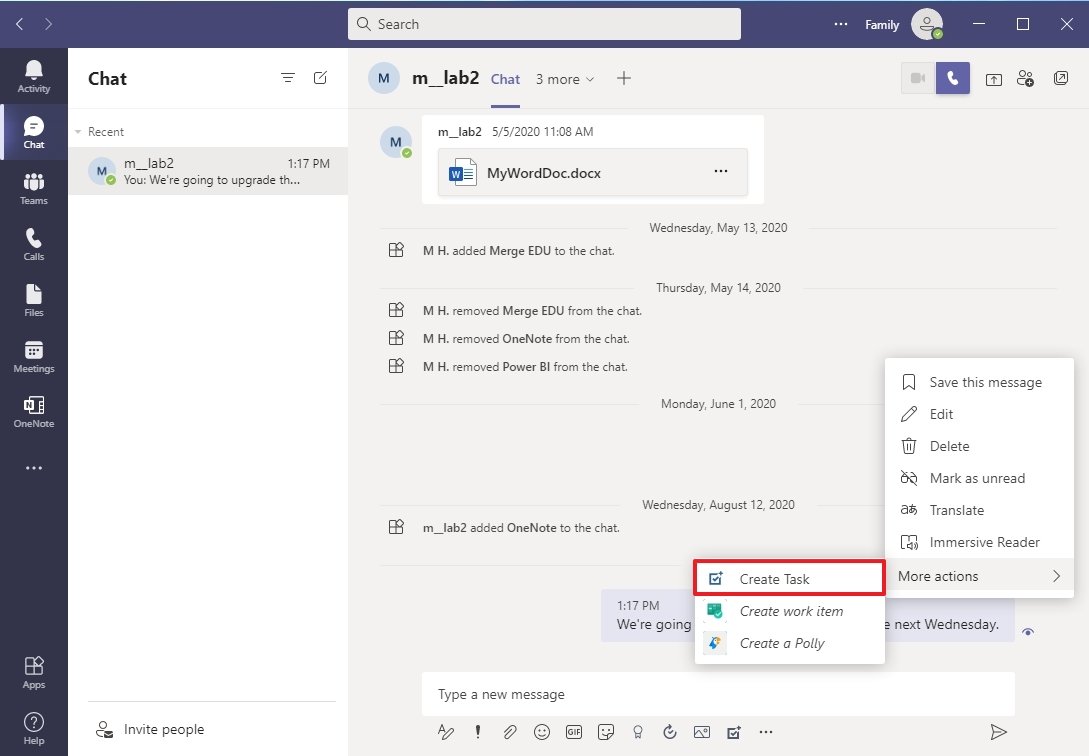
Microsoft Teams – Create a To-Do task from chat

Here’s a nice feature that was announced by Microsoft in 2020, and it’s finally rolling out.
You can now easily create a To-Do task from a chat line.

To achieve this, you just need to:

  • Click the “…” on any chat or channel message
  • Select “More Actions”
  • Select the option “Create Task”

Intune – Common q&a about device policies

One of the most common things when transitioning to a modern endpoint management, it’s about the way IT admins are used to make changes or deploy a software, and the time it takes that change to take effect in devices.

Intune is not an exception and sometimes it may feel a little frustrating when it seems that nothing is really happening.

We this in mind, Microsoft compiled a series of q&a about how are the device policies apllied when using Intune.

Take a look here:
Microsoft Docs - Common questions and answers with device policies and profiles in Microsoft Intune