Friday, June 30, 2023

Adding seconds to the clock on Windows 11


You now have the ability to add seconds to your Windows 11 clock in the taskbar.

Just keep in my that to achieve this, will need to have already installed WIndows 11 May 2023 update (aka Moment 3).

To achieve that, just follow these steps:

  1. Open Settings

  2. Click on Personalization

  3. Then click the Taskbar option on the right side

  4. Expand the option Taskbar behaviors

  5. Check the option "Show seconds in system tray clock"

And that's it! 

Thursday, June 29, 2023

PS Scripts - Remove Windows Inbox Apps


Here's a nice script to remove all or specific Windows Inbox Apps like Xbox App, Skype, Bing Weather, etc.

Monday, June 26, 2023

PS Scripts - Set Windows Registered User and Organization


Here's a quick and easy PowerShell script to set Windows registered owner and organization. The script will automatically set the owner as the logged user.

Tip: Use it during Autopilot deployment so you can have this information automatically added after the assigned user sign-in.

Drivers and Firmware updates coming to Intune soon!


I think this may be one of the most requested features for Intune, and will be generally available during June 2023!
Microsoft will rollout a new feature that allows Intune admins to manage drivers and firmware updates for enrolled devices.


Acording to the roadmap, you'll soon get this feature and it allows a lot of customization, like selecting automatic drivers update, manual driver update with approving, etc.

Take a look at Microsoft presentation here:


Thursday, June 22, 2023

Windows Autopilot Ultimate Guide by Robin Hobo


If you're looking for the most comprehensive step-by-step guide for Windows Autopilot, I strongly recommend you to take a look to Robin Hobo's "Windows Autopilot – The ultimate step-by-step deployment guide".

It's just so simple, accessible and straight forward that you will start using Autopilot in a couple of hours.

So, go ahead and take a look to Robin Hobo's post:
Robin Hobo - Windows Autopilot – The ultimate step-by-step deployment guide

Monday, February 27, 2023

Windows Deployment Services (WDS) - Issues after upgrade OS (Solved)


This is just a quick guide of something that happened me last week.
After upgrading a server from Windows 2012 to Windows 2019, I got some issues with Windows Deployment Services (WDS).

Basically, the service was up and running but no MMC console, no clients could find the boot file, etc.
After some research, I found out 2 easy command-lines that solved the issue:
  1. Open an elevated command-line

  2. Run the following command:
    wdsutil /Verbose /Progress /Uninitialize-Server
    wdsutil /Verbose /Progress /Initialize-Server /REMINST:"c:\RemoteInstall"

  3. Reboot the server
Just keep in mind that you should point the /REMINST to the folder where you have your WDS installed.

Sunday, February 12, 2023

Windows 11 - How to bypass Internet connection install requirement


Starting with version 22H2 of Windows 11, Microsoft requires an Internet connection to install the OS. But...does it really?

Here's a quick step guide to bypass this requirement:

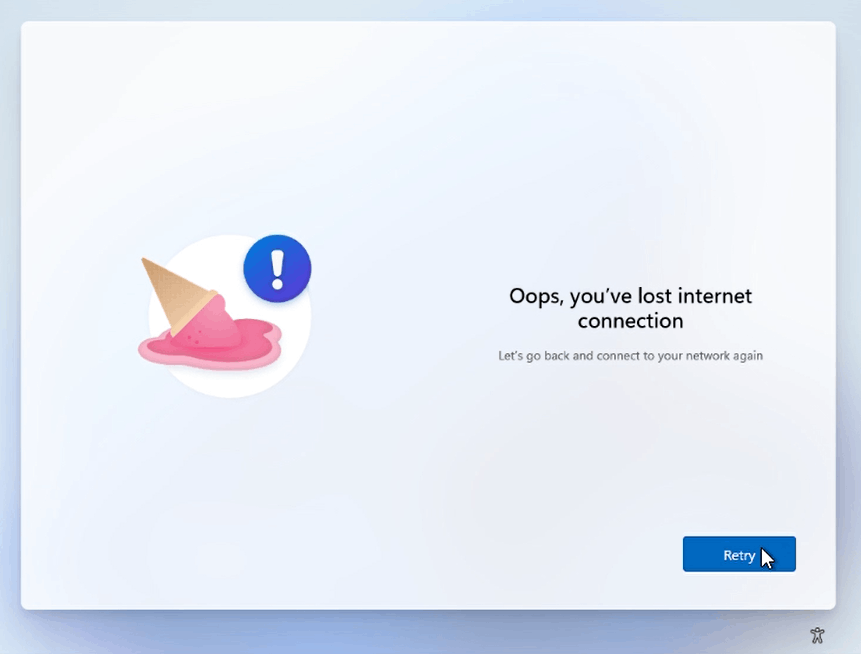
  1. Through the OOBE experience, you'll get to a screen that will say:
    "Oops, you've lost internet connection" or "Let's connect you to a network"

  2. Press "Shift+F10" to open a command-prompt

  3. In the cmd run the following command:
    OOBE\BYPASSNRO

  4. Your computer will restart and the OOBE will start again, but...now we have a new option called "I don't have Internet"


  5. And...it's done!