Showing posts with label hotfix. Show all posts

Thursday, December 6, 2018

Access 2016 – Could not find installable ISAM [Solved]

clip_image001

Here’s a quick tip for everyone that uses Microsoft Access with dBase queries and it’s getting the error “Could not find installable ISAM” after upgrading to Access 2016.

To solve this you need to install 2 hotfixes for Access 2016:
KB4018338 (Microsoft Catalog)
KB4011143 (Microsoft Catalog)

After installing both updates, restart the machine and you’re done!

Wednesday, November 15, 2017

Windows 10 – KB4048955 - Cumulative Update – November 14, 2017

WU_Logo_001

It’s now available the Microsoft Windows 10 Cumulative Update November 14, 2017.
The quality update KB4048955 sets Windows 10 build to version 16299.64.

Improvements and Fixes

  • Addressed issue that causes the Mixed Reality Portal to stop responding on launch.
  • Addressed issue that causes a black screen to appear when you switch between windowed and full-screen modes when playing some Microsoft DirectX games.
  • Addressed a compatibility issue that occurs when you play back a Game DVR PC recording using Android or iOS devices.
  • Addressed issue where the functional keys stop working on Microsoft Designer Keyboards.
  • Addressed issue to ensure that certain USB devices and head-mounted displays (HMD) are enumerated properly after the system wakes up from Connected Standby.
  • Addressed issue where the virtual smart card doesn't assess the Trusted Platform Module (TPM) vulnerability correctly.
  • Addressed issue where Get-StorageJob returns nothing when there are storage jobs running on the machine.
  • Addressed issue where applications based on the Microsoft JET Database Engine (Microsoft Access 2007 and older or non-Microsoft applications) fail when creating or opening Microsoft Excel .xls files. The error message is: “Unexpected error from external database driver (1). (Microsoft JET Database Engine)".
  • Addressed issue where application tiles are missing from the Start menu. Additionally, applications that the Store app show as installed don't appear on the application list of the Start menu. Computers that have Internet connectivity and upgrade on or after November 14, 2017 will receive this preventative solution and avoid this issue. Machines that lack network connectivity or have already encountered this issue should follow the steps in the Microsoft Answers thread “Missing apps after installing Windows 10 Fall Creators Update”. Microsoft will release and document an additional solution in a future release.
  • Addressed issue where Microsoft Edge cannot create a WARP support process and appears to stop responding for up to 3 seconds during a wait timeout. During the timeout period, users cannot navigate or interact with the requested page.
  • Security updates to Microsoft Scripting Engine, Microsoft Edge, Microsoft Graphics Component, Windows kernel, Internet Explorer, and Windows Media Player.

Download
You can download this cumulative update from Microsoft Update Catalog

Thursday, October 19, 2017

Windows 10 – KB4043961 - Cumulative Update – October 17, 2017

windowsupdate

And here’s the first cumulative update for Windows 10 v1709 (Fall Creators Update)!

This is Microsoft Windows 10 Cumulative Update October 17, 2017.
The quality update KB4043961 sets Windows 10 build to version 16299.19.

Improvements and Fixes

This update includes quality improvements. No new operating system features are being introduced in this update. Key changes include:

  • Addressed issue where, after removing apps, they're reinstalled on every restart, logoff, and login.
  • Addressed issue where localization of the error output from a JET database is broken. Only English error strings are reported.
  • Security updates to Windows kernel-mode drivers, Microsoft Graphics Component, Internet Explorer, Windows kernel, Microsoft Windows Search Component, Windows TPM, Windows NTLM, Device Guard, Microsoft Scripting Engine, Windows Wireless Networking, Microsoft Windows DNS, Windows Server, Microsoft JET Database Engine, and the Windows SMB Server .

Download
You can download this cumulative update from Microsoft Update Catalog

Tuesday, October 10, 2017

Windows 10 – KB4041676 - Cumulative Update – October 10, 2017

update3_thumb1_thumb1_thumb1_thumb[1]

It’s now available the Microsoft Windows 10 Cumulative Update October 10, 2017.
The quality update KB4041676 sets Windows 10 build to version 15063.674.

Improvements and Fixes

  • Addressed issue where some UWP and Centennial apps show a gray icon and display the error message "This app can't open" on launch.
  • Addressed reliability issue that causes the AppReadiness service to stop working.
  • Addressed issue where applications that use the Silverlight map stack stop working.
  • Addressed issue where VSync prevents devices from entering Panel Self Refresh mode, which can lead to reduced battery life.
  • Addressed issue where user customizations (like pinned tiles) made to an enforced partial Start layout are lost when upgrading to Windows 10 1703.
  • Addressed issue where the Universal CRT caused the linker (link.exe) to stop working for large projects.
  • Addressed issue that prevents Windows Error Reporting from saving error reports in a temporary folder that is recreated with incorrect permissions. Instead, the temporary folder is inadvertently deleted.
  • Addressed issue where the MSMQ performance counter (MSMQ Queue) may not populate queue instances when the server hosts a clustered MSMQ role.
  • Addressed issue with the token broker where it was leaking a token that caused sessions to remain allocated after logoff.
  • Addressed issue where Personal Identity Verification (PIV) smart card PINs are not cached on a per-application basis. This caused users to see the PIN prompt multiple times in a short time period; normally, the PIN prompt only displays once.
  • Addressed issue where using the Cipher.exe /u tool to update Data Recovery Agent (DRA) encryption keys fails unless user certification encryption already exists on the machine.
  • Addressed issue where using AppLocker to block a Modern app fails. This issue occurs only with Modern apps that come pre-installed with Windows.
  • Addressed issue with form submissions in Internet Explorer.
  • Addressed issue with the rendering of a graphics element in Internet Explorer.
  • Addressed issue that prevents an element from receiving focus in Internet Explorer.
  • Addressed issue with the docking and undocking of Internet Explorer windows.
  • Addressed issue caused by a pop-up window in Internet Explorer.
  • Addressed issue where a Vendor API deleted data unexpectedly.
  • Addressed issue where using the Robocopy utility to copy a SharePoint document library, which is mounted as a drive letter, fails to copy files. However, in this scenario, Robocopy will copy folders successfully.
  • Addressed issue where MDM USB restrictions did not disable the USB port as expected.
  • Addressed issue where creating an iSCSI session on a new OS installation may result in the "Initiator instance does not exist" error when attempting to connect to a target.
  • Addressed issue where connecting to RDS applications published using Azure App Proxy fails. The error message is, “Your computer can’t connect to the Remote Desktop Gateway server. Contact your network administrator for assistance”. The error can occur when the RDP cookie size limit is exceeded. This update increased the size of the RDP cookie limit.
  • Addressed issue where USBHUB.SYS randomly causes memory corruption that results in random system crashes that are extremely difficult to diagnose.

  • Addressed issue that affects the download of some games from the Microsoft Store during the pre-order phase. Download fails with the error code 0x80070005, and the device attempts to restart the download from the beginning.

  • Addressed issue where the ServerSecurityDescriptor registry value does not migrate when you upgrade to Windows 10 1703. As a result, users might not be able to add a printer using the Citrix Print Manager service. Additionally, they might not be able to print to a client redirected printer, a Citrix universal print driver, or a network printer driver using the Citrix universal print driver.

  • Security updates to Microsoft Windows Search Component, Windows kernel-mode drivers, Microsoft Graphics Component, Internet Explorer, Windows kernel, Microsoft Edge, Windows Authentication, Windows TPM, Device Guard, Windows Wireless Networking, Windows Storage and Filesystems, Microsoft Windows DNS, Microsoft Scripting Engine, Windows Server, Windows Subsystem for Linux, Microsoft JET Database Engine, and the Windows SMB Server.


Download
You can download this cumulative update from Microsoft Update Catalog

Saturday, September 30, 2017

Windows 10 – KB4040724 - Cumulative Update – September 25, 2017

update3_thumb1_thumb1_thumb1

It’s now available the Microsoft Windows 10 Cumulative Update September 25, 2017.
The quality update KB4040724 sets Windows 10 build to version 15063.632.

Improvements and Fixes

  • Reliability improvements and fixes for cellular connectivity.
  • Addressed issue in Microsoft Edge where on first launch after installing KB4038788, or periodically thereafter, users may observe performance issues or unresponsiveness until the next launch of the browser.

Download
You can download this cumulative update from Microsoft Update Catalog

Saturday, September 16, 2017

Windows 10 – KB4038788 - Cumulative Update – September 12, 2017

update3_thumb1_thumb1

It’s now available the Microsoft Windows 10 Cumulative Update September 12, 2017.
The quality update KB4038788 sets Windows 10 build to version 15063.608.

Improvements and Fixes

  • Addressed issue where the color profiles do not revert to the user-specified settings after playing a full-screen game.
  • Updated HDR feature to be turned off by default in the OS.
  • Addressed issue where you can't open the Start menu when you add a third-party IME.
  • Addressed issue with scanners that rely on inbox driver support.
  • Addressed issue in a Mobile Device Manager Enterprise feature to allow headsets to work correctly.
  • Addressed issue where some machines fail to load wireless WAN devices when they resume from Sleep.
  • Addressed issue where Windows Error Reporting doesn't clean up temporary files when there is a redirection on a folder.
  • Addressed issue where revoking a certificate associated with a disabled user account in the CA management console fails. The error is "The user name or password is incorrect. 0x8007052e (WIN32: 1326 ERROR_LOGON_FAILURE)”.
  • Addressed issue where LSASS is leaking large amounts of memory.
  • Addressed issue where enabling encryption using syskey.exe renders the system unbootable.
  • Updated the BitLocker.psm1 PowerShell script to not log passwords when logging is enabled.
  • Addressed issue where saving a credential with an empty password to Credential Manager causes the system to crash when attempting to use that credential.
  • Updates to Internet Explorer 11’s navigation bar with search box.
  • Addressed issue in Internet Explorer where undo is broken if character conversion is canceled using IME.
  • Addressed issue with the EMIE where Microsoft Edge and Internet Explorer repeatedly switched between each other.
  • Addressed issue where a device may stop responding for several minutes and then stop working with error 0x9F (SYSTEM_POWER_STATE_FAILURE) when a USB network adapter is attached.
  • Addressed issue where some apps cannot be opened because the IPHlpSvc service stops responding during the Windows boot procedure.
  • Addressed issue where spoolsv.exe stops working.
  • Addressed issue where the Get-AuthenticodeSignature cmdlet does not list TimeStamperCertificate even though the file is time stamped.
  • Addressed issue where, after upgrading to Windows 10, users may experience long delays when running applications hosted on Windows Server 2008 SP2.
  • Addressed RemoteApp display issues that occur when you minimize and restore a RemoteApp to full-screen mode.
  • Addressed issue that sometimes causes Windows File Explorer to stop responding and causes the system to stop working.
  • Addressed issue that causes the Export-StartLayout cmdlet to fail when exporting the layout of tiles at startup.
  • Addressed issue where the option to join Azure AAD is sometimes unavailable during the out-of-box experience.
  • Addressed issue where clicking the buttons on Windows Action Center notifications results in no action being taken.
  • Re-release of MS16-087- Security update for Windows print spooler components.
  • Security updates to Microsoft Graphics Component, Windows kernel-mode drivers, Windows shell, Microsoft Uniscribe, Microsoft Edge, Device Guard, Windows TPM, Internet Explorer, Microsoft Scripting Engine, Windows Hyper-V, Windows kernel, and Windows Virtualization.

Download
You can download this cumulative update from Microsoft Update Catalog

Tuesday, August 8, 2017

Windows 10 – KB4034674 - Cumulative Update – August, 8 2017

update3_thumb[1]

It’s now available the Microsoft Windows 10 Cumulative Update August,8 2017.
The quality update KB4032188 sets Windows 10 build to version 15063.540.

Improvements and Fixes

  • Addressed issue where the policies provisioned using Mobile Device Management (MDM) should take precedence over policies set by provisioning packages.
  • Addressed issue where the Site to Zone Assignment List group policy (GPO) was not set on machines when it was enabled.
  • Addressed issue where the AppLocker rules wizard crashes when selecting accounts.
  • Addressed issue where the primary computer relationship is not determined when you have a disjoint NetBIOS domain name for your DNS Name. This prevents folder redirection and roaming profiles from successfully blocking your profile or redirects folders to a non-primary computer.
  • Addressed issue where an access violation in the Mobile Device Manager Enterprise feature causes stop errors.
  • Security updates to Microsoft Edge, Microsoft Windows Search Component, Microsoft Scripting Engine, Microsoft Windows PDF Library, Windows Hyper-V, Windows Server, Windows kernel-mode drivers, Windows Subsystem for Linux, Windows shell, Common Log File System Driver, Internet Explorer, and the Microsoft JET Database Engine.

If you installed earlier updates, only the new fixes contained in this package will be downloaded and installed on your device.

Download
You can download this cumulative update from Microsoft Update Catalog

Friday, August 4, 2017

Windows 10 – KB4032188 - Cumulative Update – July, 31 2017

update3
It’s now available the Microsoft Windows 10 Cumulative Update July,31 2017.
The quality update KB4032188 sets Windows 10 build to version 15063.502.

Improvements and Fixes
  • Addressed issue that causes a Microsoft Installer (MSI) application to fail for standard (non-admin) users when installed on a per user basis.
  • Addressed issue to enable support in the DevDetail Configuration Service Provider (CSP) to return the UBR number in the D part of the SwV node. 
  • Addressed issue where NTFS sparse files were unexpectedly truncated (NTFS sparse files are used by Data Deduplication—deduplicated files may be unexpectedly corrupted as a result). Also updated chkdsk to detect which files are corrupted.
  • Addressed issue where the IME pad was not launching correctly in the Microsoft Edge browser for certain markets. 
  • Addressed issue to allow Win32 applications to work with various Bluetooth LE devices including head tracking devices.
  • Addressed issue in the Mobile Device Manager Enterprise feature to allow headsets to work correctly. 
  • Addressed issue where device drivers are not loading.
  • Addressed a reliability issue when playing specific types of spatial sound content.
  • Addressed issue with a dropped key on Microsoft Surface Keyboard and Microsoft Surface Ergo Keyboard, and addressed Wacom active pen connection failures. 
  • Addressed issue to improve stability for USB type C during device arrival and removal during system power changes. 
  • Addressed USB host controller issue where the host controller no longer responds to the attached peripherals. 
  • Addressed MP4 compatibility issue while playing content from a social media site in Microsoft Edge. 
  • Addressed issue with audio headsets connected to a PC through Xbox 360 controllers.
  • Addressed a reliability issue with launching a Settings app while another application is using the camera device concurrently.
  • Addressed issue with notifications (SMS, Calendar) for an activity tracker. 
  • Addressed issue with video playback artifacts during transitions from portrait to landscape on mobile devices.
  • Addressed issue with Skype calls becoming unresponsive after about 20 minutes when using Bluetooth headsets with Hands-Free Profile (HFP) connections with negotiated mSBC codec (Wideband Speech). 
  • Addressed issue where a service using a Managed Service Account (MSA) fails to connect to the domain after an automatic password update. 
  • Addressed issue where, in some cases, a drive that utilizes on-drive hardware encryption would not automatically unlock at system startup. 
  • Addressed issue where “cipher.exe /u” fails on client machines that are deployed with InTune, Windows Information Protection (WIP), and an updated Data Recovery Agent (DRA) certificate. Cipher.exe will fail with one of the following errors: “The request is not supported" or "The system cannot find the file specified”. 
  • Addressed issue where a memory leak occurs in a nonpaged pool with the “NDnd” memory tag when you have a network bridge set up. 
  • Addressed issue where you cannot add Work and School accounts in Windows Store, and you may get an error that reads, “We encountered an error; please try signing in again later.” 
  • Addressed issue issue where if a Surface Hub enters Sleep mode and then resumes, it may require the user to sign in to Skype again. 
  • Addressed issue where some Windows Forms (WinForms) applications that use DataGridView, Menu controls, or call a constructor for a Screen object experienced performance regressions in .NET 4.7. This was caused by additional Garbage Collections. In some cases, there was an empty UI because of a lack of GDI+ handles.Addressed issue where Magnifier Lens users cannot click on buttons or select web content in Microsoft Edge or Cortana results.
  • Addressed issue introduced in the June updates where some applications may not launch when a device resumes from Connected Standby mode.
Download
You can download this cumulative update from Microsoft Update Catalog


Sunday, July 16, 2017

Windows 10 – Cumulative Updates – July 2017

update

It’s now available the Microsoft Windows 10 Cumulative Update for July 2017.
The quality update KB4025342 sets Windows 10 build to version 15063.483.

Improvements and Fixes

  • Addressed issue introduced by KB4022716 where Internet Explorer 11 may close unexpectedly when you visit some websites.
  • Addressed issue to improve MediaCreationTool.exe support for Setup Tourniquet scenarios.
  • Addressed issue with CoreMessaging.dll that may cause 32-bit apps to crash on the 64-bit version of the Windows OS.
  • Addressed an issue where Visual Studio or a WPF application may terminate unexpectedly (stops responding, followed by a crash) when running on a pen and/or touch enabled machine with Windows 10 Creators Update.
  • Addressed issue that causes the system to crash when certain USB devices are unplugged while the system is asleep.
  • Addressed issues with screen orientation that stops working after lid close and lid open transitions.
  • Addressed issue that causes .jpx and .jbig2 images to stop rendering in PDF files.
  • Addressed issue where users could not elevate to Administrator through the User Account Control (UAC) dialog when using a smart card.
  • Addressed issue where input using the Korean handwriting feature dropped the last character of a word or moved it to the next line incorrectly.
  • Addressed issue with a race condition between the App-V Catalog Manager and the Profile Roaming Service. A new registry key is available to control the waiting period for App-V Catalog Manager, which allows any third-party Profile Roaming Service to complete.
  • Addressed issue where controls in Win32 applications intermittently fail to render correctly when started from a logoff script using the "run shutdown scripts visible" policy described in https://msdn.microsoft.com/en-us/library/ms811629.aspx.
  • Security updates to Internet Explorer 11, Microsoft Edge, Windows Search, Windows kernel, Windows shell, Microsoft Scripting Engine, Windows Virtualization, Datacenter Networking, Windows Server, Windows Storage and File Systems, Microsoft Graphics Component, Windows kernel-mode drivers, ASP.NET, Microsoft PowerShell, and the .NET Framework.

Download

You can download this cumulative update from Microsoft Update Catalog

Monday, July 3, 2017

Win10 Deploy–Stuck at 20% during Install Operating System [Solved]

Today, after adding Windows 10 v1703 Cumulative Update June 2017 (KB4022716) to my base image, it was time to test the image deployment.

Don’t understanding why, all my installations got stuck at 20%…for hours!

After thinking a little bit about this, I took a quick look to BDD.log and there was a really strange thing.
The log add a lot of lines similar to this one:
Add package {7fe1f303-a528-4154-904b-ee10f4d79068} ZTIPatches 29.7.2012 23:06:09 0 (0x0000)

Basically, a lot of updates/hotfixes were installing and then…the issue!

This may be a “beginner mistake” but what was happening was as simple as this:

I use the same MDT Deployment Share for my other base images.

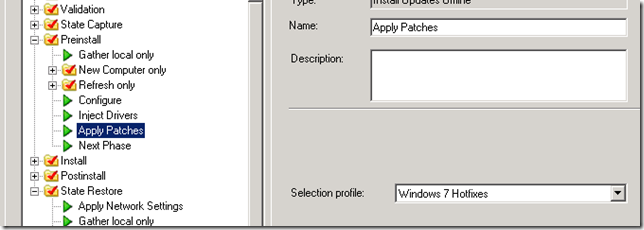
To save me some time, I’ve copied my Windows 7 x64 task sequence and completely forgot to change my Selection Profile from “Windows 7 Hotfixes” to “Windows 10 Hotfixes” and…well…basically I was applying all my Windows 7 x64 hotfixes to my Windows 10 x64 installation..
Untitled

So, this in not a bug or something like that but just a simple mistake that took me some time to solve.

Hope this save other some time!

Tuesday, June 27, 2017

Petya Ransomware – Protect Yourself!


And again…another large scale ransomware comes to the web…
This time, it’s called Pety and much like last month Wannacry, it overwrites the Master Boot Record (MBR) with Ramson:DOS/Petya.A and encrypts system drive sectors.
After a forced reboot, the user is locked out of the the system and coerced into purchasing a key to free up the system.
A recovery information similar to the screenshot above is displayed.
What should you do?

1 – If you haven’t done this before, during Wannacry threat, and  you’re lucky enough not to get infected, than you should install Microsoft MS17-010 Update Rollout

Here’s the direct links:
Product
Security Update Rollup
Standalone Update
Windows 10 / Server 2016 v1703 Already patched N/A
Windows 10 / Server 2016 v1607 KB4022715 N/A
Windows 10 / Server 2016 v1511 KB4022714 N/A
Windows 10 / Server 2016 “v1” KB4022727 N/A
Windows 8.1 / Server 2012 R2 KB4022717 KB4012213
Windows 8 / Server 2012 N/A KB4012598
Windows 7 / Server 2008 R2 KB4022722 KB4012212
Windows Vista / Server 2008 N/A KB4012598
Windows XP / Server 2003 N/A KB4012598


2 – Now for Petya, you should patch your Microsoft Office with one of the following hotfixes from CVE-2017-0199:

Product
Update
Office 2007 KB3141529
Office 2010 KB3141538
Office 2013 KB3178710
Office 2016 KB3178703