Showing posts with label update. Show all posts

Wednesday, July 24, 2019

Office 365 ProPlus Update History

This is just a quick post if you ever need to know the update history for Microsoft Office 365.
This listings include information about dates, what was updates on each update channel, etc

Microsoft Office 365 ProPlus Update History

Sunday, April 14, 2019

[Solved] Windows Admin Center not opening in Edge after update

If you’ve recently upgraded Windows Admin Center to the latest version, you may get the following error in Edge:
”HTTP 403 error saying "can't get to this page"

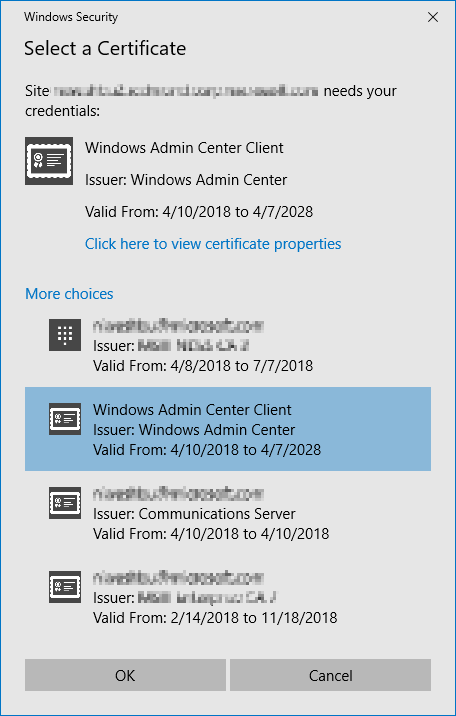
In my case, this happened because I was not selecting the correct certificate when launching WAC.

So, when launching WAC, make sure you select the following certificate:
Thursday, December 6, 2018

Access 2016 – Could not find installable ISAM [Solved]

clip_image001

Here’s a quick tip for everyone that uses Microsoft Access with dBase queries and it’s getting the error “Could not find installable ISAM” after upgrading to Access 2016.

To solve this you need to install 2 hotfixes for Access 2016:
KB4018338 (Microsoft Catalog)
KB4011143 (Microsoft Catalog)

After installing both updates, restart the machine and you’re done!

Friday, November 3, 2017

Tips & Tricks – IE11 Enterprise Mode – Forcing to Update Websites List

Sometimes you need to do a quick change to your IE11 Enterprise Mode site list and you also need to quickly test this change.

To force the update of websites list just do the following:

  1. Do you changes using the Enterprise Mode Site List Manager
  2. On your target machine, close all Internet Explorer instances
  3. Open registry editor (regedit.exe)
  4. Navigate to HKEY_CURRENT_USER\Software\Microsoft\InternetExplorer\Main\EnterpriseMode
  5. Delete the entry called “CurrentVersion
  6. Open Internet Explorer again
  7. Done!

Friday, August 4, 2017

Windows 10 – KB4032188 - Cumulative Update – July, 31 2017

update3
It’s now available the Microsoft Windows 10 Cumulative Update July,31 2017.
The quality update KB4032188 sets Windows 10 build to version 15063.502.

Improvements and Fixes
  • Addressed issue that causes a Microsoft Installer (MSI) application to fail for standard (non-admin) users when installed on a per user basis.
  • Addressed issue to enable support in the DevDetail Configuration Service Provider (CSP) to return the UBR number in the D part of the SwV node. 
  • Addressed issue where NTFS sparse files were unexpectedly truncated (NTFS sparse files are used by Data Deduplication—deduplicated files may be unexpectedly corrupted as a result). Also updated chkdsk to detect which files are corrupted.
  • Addressed issue where the IME pad was not launching correctly in the Microsoft Edge browser for certain markets. 
  • Addressed issue to allow Win32 applications to work with various Bluetooth LE devices including head tracking devices.
  • Addressed issue in the Mobile Device Manager Enterprise feature to allow headsets to work correctly. 
  • Addressed issue where device drivers are not loading.
  • Addressed a reliability issue when playing specific types of spatial sound content.
  • Addressed issue with a dropped key on Microsoft Surface Keyboard and Microsoft Surface Ergo Keyboard, and addressed Wacom active pen connection failures. 
  • Addressed issue to improve stability for USB type C during device arrival and removal during system power changes. 
  • Addressed USB host controller issue where the host controller no longer responds to the attached peripherals. 
  • Addressed MP4 compatibility issue while playing content from a social media site in Microsoft Edge. 
  • Addressed issue with audio headsets connected to a PC through Xbox 360 controllers.
  • Addressed a reliability issue with launching a Settings app while another application is using the camera device concurrently.
  • Addressed issue with notifications (SMS, Calendar) for an activity tracker. 
  • Addressed issue with video playback artifacts during transitions from portrait to landscape on mobile devices.
  • Addressed issue with Skype calls becoming unresponsive after about 20 minutes when using Bluetooth headsets with Hands-Free Profile (HFP) connections with negotiated mSBC codec (Wideband Speech). 
  • Addressed issue where a service using a Managed Service Account (MSA) fails to connect to the domain after an automatic password update. 
  • Addressed issue where, in some cases, a drive that utilizes on-drive hardware encryption would not automatically unlock at system startup. 
  • Addressed issue where “cipher.exe /u” fails on client machines that are deployed with InTune, Windows Information Protection (WIP), and an updated Data Recovery Agent (DRA) certificate. Cipher.exe will fail with one of the following errors: “The request is not supported" or "The system cannot find the file specified”. 
  • Addressed issue where a memory leak occurs in a nonpaged pool with the “NDnd” memory tag when you have a network bridge set up. 
  • Addressed issue where you cannot add Work and School accounts in Windows Store, and you may get an error that reads, “We encountered an error; please try signing in again later.” 
  • Addressed issue issue where if a Surface Hub enters Sleep mode and then resumes, it may require the user to sign in to Skype again. 
  • Addressed issue where some Windows Forms (WinForms) applications that use DataGridView, Menu controls, or call a constructor for a Screen object experienced performance regressions in .NET 4.7. This was caused by additional Garbage Collections. In some cases, there was an empty UI because of a lack of GDI+ handles.Addressed issue where Magnifier Lens users cannot click on buttons or select web content in Microsoft Edge or Cortana results.
  • Addressed issue introduced in the June updates where some applications may not launch when a device resumes from Connected Standby mode.
Download
You can download this cumulative update from Microsoft Update Catalog


Sunday, July 16, 2017

Windows 10 – Cumulative Updates – July 2017

update

It’s now available the Microsoft Windows 10 Cumulative Update for July 2017.
The quality update KB4025342 sets Windows 10 build to version 15063.483.

Improvements and Fixes

  • Addressed issue introduced by KB4022716 where Internet Explorer 11 may close unexpectedly when you visit some websites.
  • Addressed issue to improve MediaCreationTool.exe support for Setup Tourniquet scenarios.
  • Addressed issue with CoreMessaging.dll that may cause 32-bit apps to crash on the 64-bit version of the Windows OS.
  • Addressed an issue where Visual Studio or a WPF application may terminate unexpectedly (stops responding, followed by a crash) when running on a pen and/or touch enabled machine with Windows 10 Creators Update.
  • Addressed issue that causes the system to crash when certain USB devices are unplugged while the system is asleep.
  • Addressed issues with screen orientation that stops working after lid close and lid open transitions.
  • Addressed issue that causes .jpx and .jbig2 images to stop rendering in PDF files.
  • Addressed issue where users could not elevate to Administrator through the User Account Control (UAC) dialog when using a smart card.
  • Addressed issue where input using the Korean handwriting feature dropped the last character of a word or moved it to the next line incorrectly.
  • Addressed issue with a race condition between the App-V Catalog Manager and the Profile Roaming Service. A new registry key is available to control the waiting period for App-V Catalog Manager, which allows any third-party Profile Roaming Service to complete.
  • Addressed issue where controls in Win32 applications intermittently fail to render correctly when started from a logoff script using the "run shutdown scripts visible" policy described in https://msdn.microsoft.com/en-us/library/ms811629.aspx.
  • Security updates to Internet Explorer 11, Microsoft Edge, Windows Search, Windows kernel, Windows shell, Microsoft Scripting Engine, Windows Virtualization, Datacenter Networking, Windows Server, Windows Storage and File Systems, Microsoft Graphics Component, Windows kernel-mode drivers, ASP.NET, Microsoft PowerShell, and the .NET Framework.

Download

You can download this cumulative update from Microsoft Update Catalog

Monday, July 10, 2017

Windows Tips – Microsoft Support - Fix problems that block programs from being installed or removed

Once in a while we find ourselves with some issues that we have no idea how to solve.
Again, once in a while we find very simple but also very useful tools, that really make the difference.

Sometimes you get that annoying error above, and we get stuck not being able to uninstall a software (normally a msi).

So…thinking on this, Microsoft created a very very simple tool that searches the machine for issues and try to correct them.

To use it? Just download, double-click, select if you’re experiencing issues to install or uninstall an application and the tool does the rest.

What it fixes

  • Corrupted registry keys for x64 operating systems
  • Corrupted registry keys that control the update data
  • Problems that prevent new programs from being installed, uninstalled or updated
  • Problems that block you from uninstalling a program through Programs and Features

Compatibility

  • Windows 7
  • Windows 8
  • Windows 8.1
  • Windows 10

Download

Fix problems that block programs from being installed or removed

Wednesday, December 2, 2015

MDT 2013 Update 1 Version 8298 - Invalid Credentials


Microsoft has recently launched a new version of Microsoft Deployment Toolkit (MDT) 2013 Update 1 version 8298.

There's been a couple of issues with this build because the way the DeploymentShare$ it's created.
If you take a look at this share permission, you'll notice that permissions are just for "CREATOR OWNER" instead of "Everyone" like the previous versions.

Besides that, now the DeployRoot parameter it's not configured on the bootstrap.ini.
So, to make this work again, follow this steps:
  1. First, you'll need to edit your DeploymentShare$ permissions so that you can connect to MDT from the machine you're deployment.
    You can achieve this simply by adding the group "Everyone" to the share permissions, or if you want to be more restrictive you can add the "Administrators" group with "Full Control".


  2. Now that you're done with the permissions, you'll need to take care of bootstrap.ini.
    To do so, just navigate to your DeploymentShare folder, and open "bootstrap.ini" that's located on the "Control" folder

  3. Here you'll have to had under "[Default]" the following parameter:
    DeployRoot=\\your_mdt_server\DeploymentShare$

  4. Save the file and you're done.

Now that's you've change the bootstrap.ini, like always, you'll need to regenerate your boot files:
  1. Open MDT Workbench and click properties on your deployment share and then Update

  2. Here you'll need to choose "Completely regenerate the boot images" and now just wait for the process to finish.

And you're done!
Hope this helps some people that are having some issues after installing this latest version of MDT.


Wednesday, August 19, 2015

Microsoft Deployment Toolkit 2013 (MDT) Update 1 Available


So, after Windows ADK for Windows 10 and Windows 10 ADMX Template got available, it's now finally available MDT 2013 Update 1!

The Microsoft free tool for operating systems deployment was made available 2 days ago.
MDT is the recommended process and toolset for automating desktop and server system deployments and includes the following benefits:

  • Unified tools and processes, including a set of guidance, for deploying desktops and servers in a common deployment console
  • Reduced deployment time and standardized desktop and server images

Some of the key features for MDT 2013 Update 1 are:
  • Support for the Windows Assessment and Deployment Kit (ADK) for Windows 10
  • Support for deployment and update of Windows 10
  • Support for System Center 2012 R2 Configuration Manager SP1 with Windows ADK for Windows 10

Go ahead and follow the download link below:

Friday, July 17, 2015

Oracle Java - Centralized Management and Control


With the release of Java 7 Update 51 and the introduction off the Exception Site List, Oracle just made IT Administrators life...more complicated.
In the search for a way to get back in control over the enterprise desktops and laptops, I've found a way not only to manage Java's Control Panel but also a way to manage the Exception Site List.

On an enterprise with more than 8000 machines to manage, obviously we get a lot of the work done using GPOs so...we needed something similar to make it possible to quickly change whatever we want in a system-wide perspective.

On a default Java installation, the Java Control Panel settings are managed using the file deployment.properties located on "%APPDATA%\LocalLow\Sun\Java\Deployment\" but of course, this is a per-user configuration.
Fortunately this can be bypassed using a file called deployment.config that point to a system-wide deployment.properties file.

Now..with no further delays, here's what you need to do:

deployment.config File

This file is used to specify where the deployment.properties file is located and if it's mandatory or not. On this file you only have to set 2 parameters, here's an example:

deployment.system.config=file\:c\:/Windows/Sun/Java/Deployment/deployment.properties
deployment.system.config.mandatory=true

deployment.properties File

This file manages Java Control Panel settings. For a complete list of parameters, go to http://docs.oracle.com/javase/7/docs/technotes/guides/jweb/jcp/properties.html

So, here's an example of what you can do with deployment.properties:

#REMOVE JAVA DESKTOP SHORTCUT
deployment.javaws.shortcut=never

#SET SECURITY LEVEL AND LOCK IT
deployment.security.level=HIGH
deployment.security.level.locked

#ENABLE USER HOME JAVA POLICY
deployment.security.use.user.home.java.policy=true

#DISABLE AUTOMATIC DOWNLOADS
deployment.javaws.autodownload=never

#DISABLE JAVA OUT OF DATE CHECK
deployment.expiration.check.enabled=false

#SET EXCEPTION SITES LIST PATH
deployment.user.security.exception.sites=c\:/Windows/Sun/Java/Deployment/exception.sites

exception.sites File
Here, you'll enter an url per line for the website you want to whitelist and nothing more is needed.


Pushing the files to all your network
So, now that you have the 3 necessary files, you'll need to put the on the machines. There are several ways to do it, I'll explain here what was the best approach for me, which was, using Group Policy Preferences (GPP).
  • Put the 3 files you've previously created on a network share accessible to all machines
  • Now, create or open an existing GPO and navigate to Computer Configuration -> Preferences -> Windows Settings -> Files
  • Create 3 file properties matching the name of the 3 files you've created. In each file you'll need to give it an action, a source and a destination path (where the destination path needs to match what you've configure for deployment.system.config.
    For example
    Action: Replace
    Source File(s): \\sharename\javapolicies\deployment.properties
    Destination File: %windir%\Sun\Java\Deployment\deployment.properties
  • At the end, you'll have something similar to this:


And...your done!
After this, just restart the machines so the GPP it's applied.
Everytime you'll need to make a change on Java configuration or add a new website to the Exception Site List, you'll just need to add it centrally!

Hope this helps anyone with similar issues.

Tuesday, September 30, 2014

Windows Phone Lumias Gets Static IP Feature


It seems the lastest firmware update for Lumia phones got a nice feature.
It's now possible to define a static ip address, subnet and gateway. It's not used massively nowadays but in some environments may be needed.

For what I know at leat Lumia 625, 925 and 525 are receiving this update.

Thursday, September 18, 2014

Disk Cleanup Wizard addon lets users delete outdated Windows updates


Here's a nice tip from a colleague of mine (Nuno Silva).

Microsoft launched an update package that installs a plugin to the Disk Cleanup Wizard which allows users to cleanup outdated Windows Updates.

This update package it's only available for Windows 7 SP1 and Windows 2008 R2 SP1.

To find more info and download the update package, go to:
Disk Cleanup Wizard addon lets users delete outdated Windows updates on Windows 7 SP1 or Windows Server 2008 R2 SP1

Wednesday, March 27, 2013

Windows 8 - Mail, Calendar and People Apps Get Updates


Although their not "state-of-the-art", The built in Mail, Calendar and People Apps, are a nice to have feature that comes with Windows 8.

They have very simple usage and are all connected with the Microsoft Live Services so with a Windows Phone you have seamlessly access to all the content.
Yesterday Microsoft launched an update to this 3 apps.

Mail App

  • Filter by All Unread e-mail
  • Filter by Flagged e-mail
  • "Smart contact suggestions" when writing a new e-mail
  • E-mail search on server (hotmail.com/outlook.com) instead off local search, if needed

         7

Calendar App


  • Calendar view updated
  • Work week view added
        4


People App

  • New swiping from top (or right-click) to open the app commands
  • New top navigation to switch between Facebook, Tweets, etc
  • Filter by social network
      11