Showing posts with label sccm. Show all posts

Tuesday, July 27, 2021

Thursday, September 24, 2020

Microsoft Endpoint Manager evaluation lab kit download available

Microsoft Endpoint Configuration Manager a.k.a. MECM it’s now the industry leader for endpoint management.
If you want to explore it’s capabilities before go all in to your production environment, or you’re simply curious about it, Microsoft made available for download an “evaluation lab kit” with guided scenarios:

Lab guide scenarios

The Microsoft Endpoint Manager Evaluation Kit lab guide provides step-by-step guidance for the following scenarios:

Directory and Network Readiness         

  • Optimize Windows 10   
  • Cloud management gateway (CMG) & cloud distribution point (CDP)   
  • CMPivot for real-time data in Configuration Manager
  • Windows Autopilot        
  • Tenant Attach, co-management and switching workloads          
  • Outlook mobile app config and app protection

Shaping devices to corporate standards

  • User file and settings migration
  • Security and Compliance            
  • Secure and deploy business applications            
  • Office and Windows as a Service

So, go ahead and learn more about Microsoft Endpoint Configuration Manager here:
Download the lab environment here in the Evaluation Center

Friday, November 22, 2019

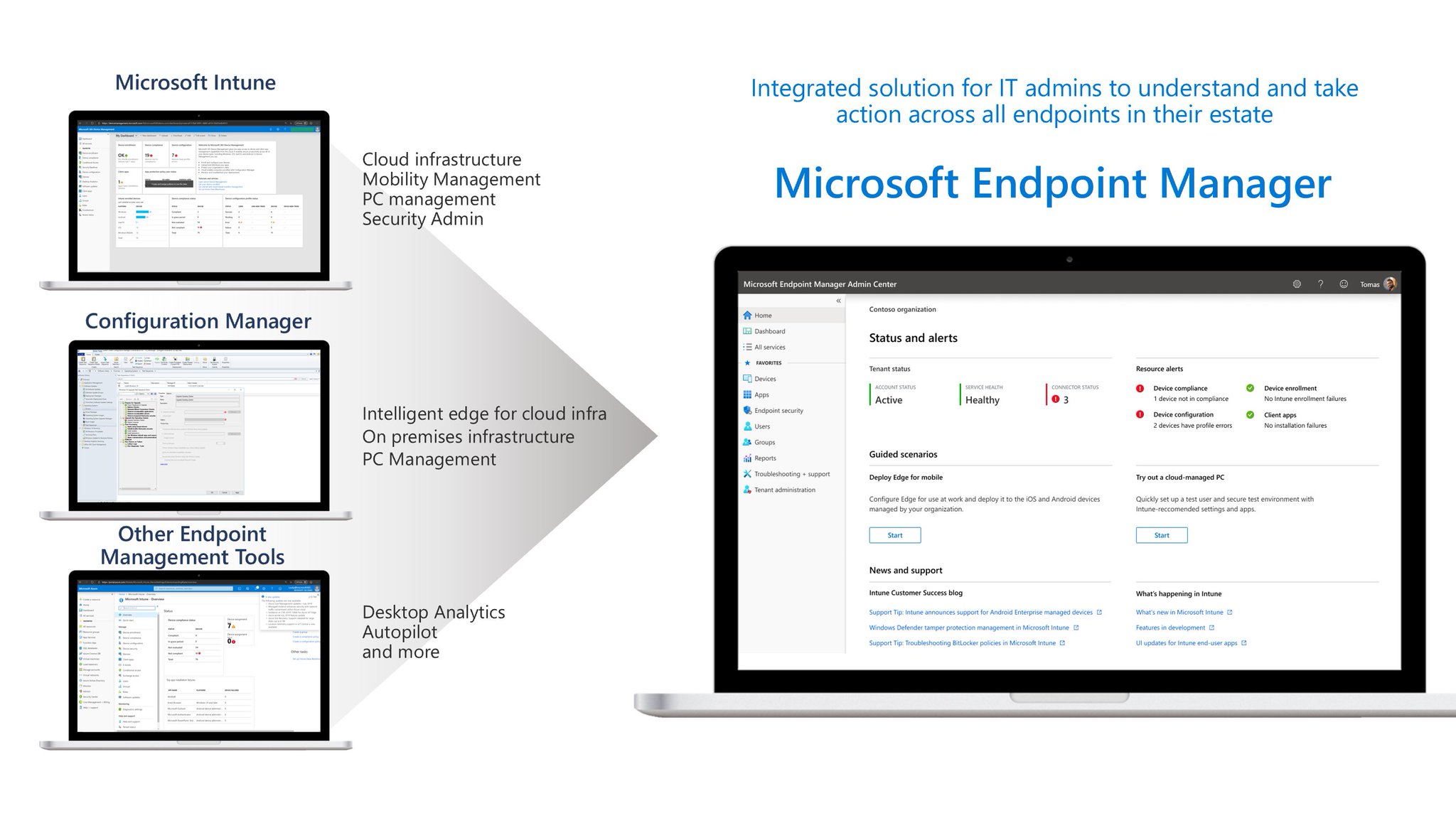
Microsoft Endpoint Manager – The Future of SCCM + Intune


Last few days at Ignite, Microsoft announced Microsoft Endpoint Manager.
This “new solution” will somewhat replace both SCCM and Intune but is more than just a new branding.
It includes Device Management, Desktop Analytics and also the co-management feature.
A lot of new features with “intelligent actions” like “Startup Perfomance Analysis” will be added to the product.
To know more about Microsoft Endpoint Manager (MEM):

Friday, September 14, 2018

Lenovo Drivers Packages Unpack Switches

LenovoLogo-POS-Red

Here’s a quick tip for unpacking Lenovo drivers:

<packagename>.exe /VERYSILENT /DIR=<packagepath> /Extract=”YES”

Example:
n20ku12w_x64.exe /VERYSILENT /DIR=”D:\Temp\LenovoDriver” /Extract=”YES”
Thursday, July 5, 2018

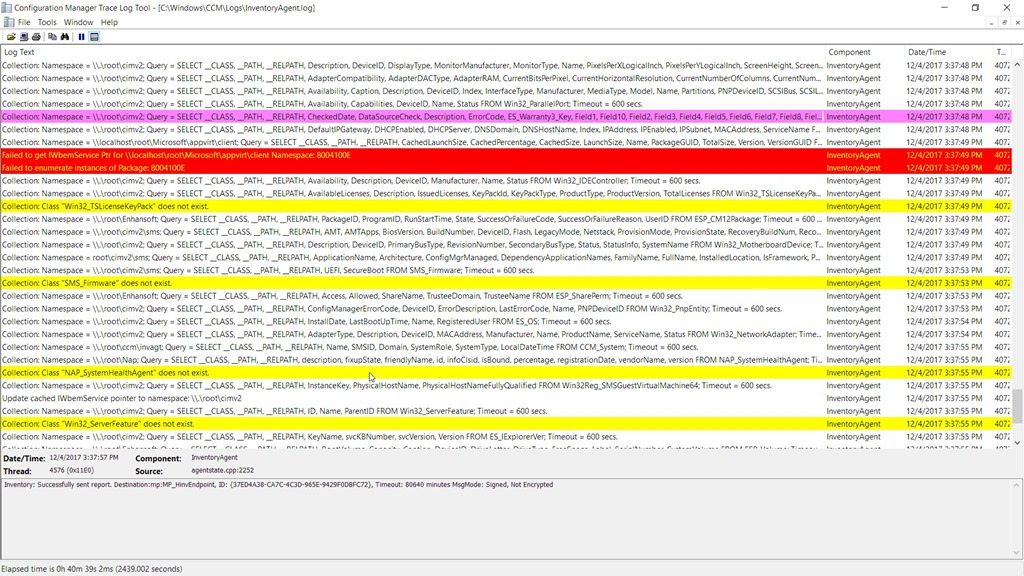
Tips & Tricks – Easy Logging Reading with CMTrace

Have you ever opened a *.log file with notepad and wished to have something else that could format everything for you, and that could also automatically show you error lines or warnings?
Than CMTrace it’s the perfect tool for you.

Bundled with SCCM 2012 R2 Toolkit (and also in previous version I believe), you’ll find CMTrace tool that does the job for you.

Download it here:
TechNet - SCCM 2012 R2 Toolkit

Wednesday, July 5, 2017

Win10 Deploy– Microsoft TechNet - Windows 10 Deployment and Management Lab Kit

Here’s a nice option if you want to quickly start testing Microsoft Windows 10 deployment without all the troubles and hurdles of creating your environment.
Microsoft TechNet gives you a 32GB virtual lab with all that you need.

This is specially nice to test before creating your final production environment.

In this virtual lab you’ll get:

  • Windows 10 Enterprise v1703 (aka Creators Update)
  • System Center 2012 Configuration Manager 1702 (aka SCCM)
  • Windows Assessment and Deployment Kit for Windows 10 v1703 (aka Windows ADK)
  • Microsoft Deployment Toolkit v8443 (aka MDT)
  • Microsoft Application Virtualization 5.1 (aka App-V)
  • Microsoft BitLocker Administration and Monitoring 2.5 Service Pack 1 (aka MBAM)
  • Windows Server 2016
  • Microsoft SQL

More information about this lab kit can be found here:
Windows 10 deployment and management lab kit

To download the lab kit directly:
Windows 10 Deployment and Management Lab Kit

Tuesday, February 7, 2017

Deployment Tips - Lenovo ThinkPad Drivers Pack for SCCM

Following other posts about drivers packs, today I would like to post about Lenovo Thinkpad drivers.
Lenovo uses a different terminology (SCCM Drivers) but of course they can be used direclty on MDT.

You’ll find this SCCM packages directly on Lenovo support website and basically you just need to select the model you need and you’ll find the drivers pack, or you can just Google something like “thinkpad t450 sccm drivers pack” and you’ll get directly to the download website.

Here’s an example: After searching for “thinkpad 440 sccm drivers” you’ll be redirect to http://support.lenovo.com/pt/en/downloads/ds030230 and you get the list of SCCM drivers available for that model and compatible models.

sccmlenovo

Wednesday, August 19, 2015

Microsoft Deployment Toolkit 2013 (MDT) Update 1 Available


So, after Windows ADK for Windows 10 and Windows 10 ADMX Template got available, it's now finally available MDT 2013 Update 1!

The Microsoft free tool for operating systems deployment was made available 2 days ago.
MDT is the recommended process and toolset for automating desktop and server system deployments and includes the following benefits:

  • Unified tools and processes, including a set of guidance, for deploying desktops and servers in a common deployment console
  • Reduced deployment time and standardized desktop and server images

Some of the key features for MDT 2013 Update 1 are:
  • Support for the Windows Assessment and Deployment Kit (ADK) for Windows 10
  • Support for deployment and update of Windows 10
  • Support for System Center 2012 R2 Configuration Manager SP1 with Windows ADK for Windows 10

Go ahead and follow the download link below:

Wednesday, April 29, 2015

MVA - Windows 8.1 Deployment Jumpstart


I'm doing this one right now.
While there's no "jumpstart" for Windows 10, here's the one for Windows 8.1.

It's called "Windows 8.1 Deployment Jumpstart" and for everyone that's very familiar with Windows 7 deployment, it's a good refresh before heading up to Windows 10.

This course covers Windows 8.1 deployment end-to-end, talking about things like MDT, SCCM, litetouch, zerotouch, acronyms, dealing with drivers, creating master images, dynamic deployments, etc.

The hosts on this jumpstart are the "usual suspects":
  • Michael Niehaus
  • Johan Ardwidmark
  • Mikael Nystrom
  • Ben Hunter

To take this jumpstart from Microsoft Virtual Academy, just go here, and have fun!

Thursday, January 2, 2014

Deploy Windows 8 with MDT

Here's a very quick but helpful video about how to install Microsoft Windows 8 with Microsoft Deployment Toolkit 2012 Update 1 (MDT).

In this video there's all you need to understand the basic steps to create a Litetouch installation.